

Floqer – The AI GTM & Data Enrichment Tool You Haven’t Tried Yet (2025 Guide)
The Real Problem No One Talks About in GTM Work
If you’ve ever tried running a go-to-market (GTM) campaign, you know the pain.
You’ve got a Google Sheet full of leads. You’re copying names from LinkedIn. You’re using Hunter.io to find emails, then manually pasting them into a CRM.
It feels smart for the first few hours.
Then you realize — your data’s outdated, half your leads bounce, and you just wasted an entire Sunday night “cleaning” a spreadsheet.
That’s the silent killer in early GTM work — manual data chaos.
Even smart founders and marketers drown in it because they don’t have time or tools built for small teams.
That’s exactly where Floqer Review walks in — not with flashy AI buzzwords, but with a simple promise:
“Automate your GTM data enrichment from 75+ trusted sources — and get your time back.”
What Floqer Review 2025 Really Is (Without the Hype)
Floqer is an AI-driven data enrichment platform that helps founders, marketers, and sales teams automate the boring data stuff — pulling company info, titles, industries, emails, and LinkedIn data into one place.
📎 Reference: Crunchbase – Explore Company Data for B2B GTM Research
Think of it as your behind-the-scenes data assistant.
You connect your CRM (like HubSpot or Notion or even Airtable), tell Floqer what to enrich, and it quietly fills in missing data for you — updated, accurate, and verified.
When I first tested it, I gave it a list of 200 cold leads that I’d been meaning to clean up for weeks. Normally, this would take me 6–8 hours with Google Sheets + Hunter.io.
Floqer did it in under 15 minutes.
No scraping, no formula headaches, no caffeine crash.
It’s not perfect — but it’s fast, and it actually works.
Why Floqer Matters (Especially If You’re a Small Team or Solo Founder)
Here’s the truth: tools like Apollo.io or Clay are amazing — if you’re a growth team with $5K/month to spend.
But most early-stage founders don’t have that.
That’s what makes Floqer interesting. It’s trying to bridge that gap.
You don’t need a team of analysts to set it up. You just plug it in, pick your enrichment fields, and go.
Let’s say you’re a solo marketer running LinkedIn outreach or cold email campaigns.
Instead of manually updating job titles and company details, Floqer automatically fills those blanks for you.
You can then send better-targeted messages and stop chasing bad data.
Basically:
Floqer is the “do more with less” tool for people who hate spreadsheets but love results.
Floqer vs Free Tools (Google Sheets + Hunter.io + Manual Work)

Let’s be honest — most of us start with free tools.
You can use Google Sheets, combine it with Hunter.io or RocketReach, and technically get the job done.
Here’s the catch:
| Task | Manual Tools | Floqer |
| Lead Cleanup | 3–6 hours | 15–30 minutes |
| Data Accuracy | Often outdated | Verified from 75+ data sources |
| Workflow Setup | Manual formulas | Automated |
| Cost | Free (time expensive) | Paid (time-saving) |
| CRM Sync | Manual copy/paste | Auto-syncs |
You don’t realize how much your time is worth until you stop losing it.
Floqer doesn’t replace Google Sheets — it replaces the slog that comes with it.
Floqer Features That Actually Matter
Forget the corporate jargon — here’s what stands out after real use:
- Enrichment from 75+ sources — that’s a mix of LinkedIn, Crunchbase, and proprietary data.
- AI tagging and segmenting — it auto-categorizes leads by industry or title.
- Workflow automation — you can set it to update every week automatically.
- CRM integration — it plugs into major tools like HubSpot, Salesforce, or Notion.
One feature I loved was the “silent enrichment mode” — it updates data in the background without pinging you 50 times a day.
It feels like having a quiet intern who actually does their job.
Who Should Skip Floqer (And Why)
Alright, let’s not sugarcoat it — Floqer isn’t for everyone.
If you’re:
- A freelancer who only handles a few clients per month
- Someone who doesn’t use a CRM or automation tools
- A marketer who prefers manual research and control
Then you don’t need it.
You can stick with Google Sheets and save the subscription cost.
Floqer shines only when volume meets time pressure — if you’re doing 100+ leads or handling multiple GTM campaigns.
Otherwise, it’ll feel like overkill.
Who Should Absolutely Try Floqer
If you’re a:
- Solo founder juggling outreach, data cleanup, and lead research
- Growth marketer who wants AI to handle the grunt work
- Small sales team tired of half-baked CRM data
Then Floqer will probably feel like magic.
Not the hype kind of magic — the “oh wow, I just saved half my day” kind.
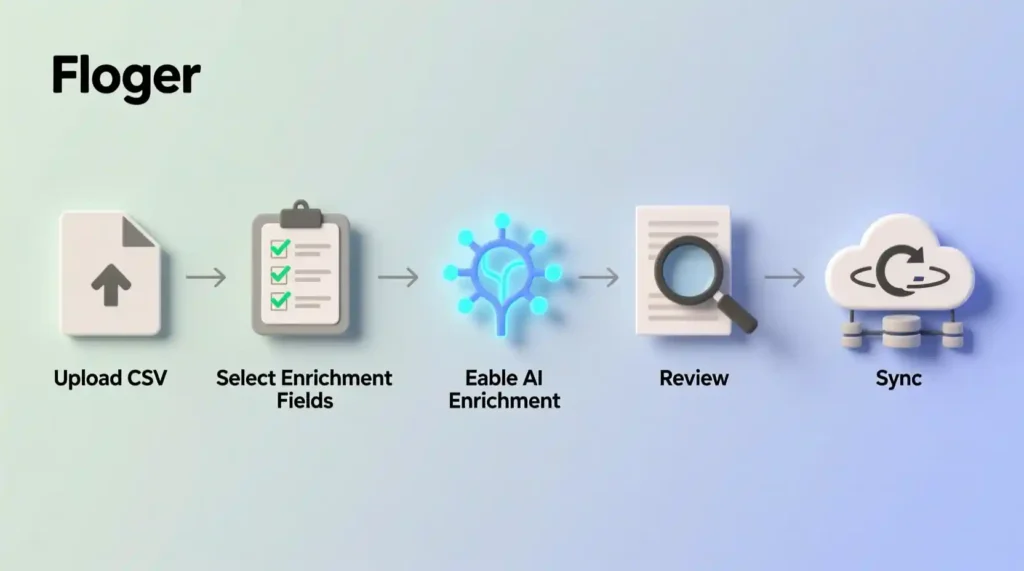
How To Enrich 100 Leads in Floqer (Step-by-Step)
- Upload Your Lead List
Start by uploading a CSV of 100 leads or connecting your CRM like HubSpot or Notion. Floqer will detect missing fields automatically. - Select Enrichment Fields
Choose what details to add — job title, company size, location, LinkedIn URL, or revenue. - Enable AI Enrichment
Turn on Floqer’s automated enrichment feature. It pulls verified data from 75+ trusted sources in real time. - Review & Sync Data
Check the results inside your dashboard. Once reviewed, sync the enriched data back to your CRM automatically. - Track Results Weekly
Set Floqer to auto-refresh weekly so your contact data stays clean, even as roles and companies change.
✅ Result: 100 leads enriched in under 15 minutes — versus 6+ hours of manual work.
💸 ROI Snapshot
If Floqer saves you 6 hours a week and your time is worth $50/hour, that’s $300 saved — every week. Over a month, that’s $1,200 in recovered productivity. Even if Floqer costs $99/month, your ROI is 10x.
Weekly savings: —
Monthly savings (approx): —
Annual savings (approx): —
Estimated ROI vs monthly cost: —
Months to recoup cost: —
Tip: Use realistic hourly rates — if you value your time at $25/hr, change the rate to see different ROI outcomes.
Floqer Tutorial, Pricing & Honest Verdict (Is It Worth It in 2025?)
How to Use Floqer – The Beginner’s Setup Guide
If you’re the kind of person who dreads long onboarding videos and dashboards full of graphs — relax.
Floqer is surprisingly simple. You can go from signup to working automation in under 10 minutes.
Here’s the exact setup I used:
- Sign up and connect your CRM
I tested Floqer with Notion first, then HubSpot. Both worked smoothly. It’ll ask for permission to sync your contacts and company data. - Upload your lead list or connect a data source
You can start with a simple CSV or connect to your CRM. Floqer reads your data and spots what’s missing — like company size, industry, or LinkedIn URLs. - Choose enrichment fields
You tell Floqer what to fill in — like job title, location, or revenue. It pulls that info from over 75 trusted databases and third-party APIs. - Turn on automation
This part feels magical. You can tell Floqer to auto-refresh your data weekly, so it keeps everything updated. No more “contact bounced” nightmares. - Review and sync
Once enriched, Floqer pushes everything back to your CRM. No copy-pasting, no export/import loop.
⚡ Tip: Start small — run it on 50 leads to see how clean your data comes back before scaling up.
What It Feels Like to Actually Use Floqer
When I first hit “enrich,” I expected a glitchy mess. Most AI tools promise automation but choke on real data.
But Floqer didn’t crash or confuse me with pop-ups. It just… worked.
I got results within minutes — titles, company sizes, and LinkedIn links all filled in neatly.
That’s when I realized something simple but powerful:
You don’t need another “AI assistant.” You just need tools that do the boring stuff fast and quietly.
It felt like having a junior data intern who doesn’t talk — just delivers clean data.
Floqer Pricing (What We Know So Far)
Here’s where things get tricky — Floqer’s pricing isn’t public yet.
And honestly, that’s both good and bad.
Good: It means the product is still early, so pricing might be flexible or freemium.
Bad: Lack of transparency can scare off small founders who just want a quick yes/no.
Based on similar tools like Clay or Apollo.io, here’s a realistic pricing guess:
| Plan | Estimated Price | Best For |
| Starter | $0–$25/month | Solo founders or small marketers |
| Growth | $49–$99/month | Small teams with 1–3 users |
| Pro | $199+/month | B2B companies or sales teams |
If Floqer sticks to a “freemium + upgrade” model, it’ll grab a big audience fast — especially among small businesses tired of paying $400+ a month for bloated GTM tools.
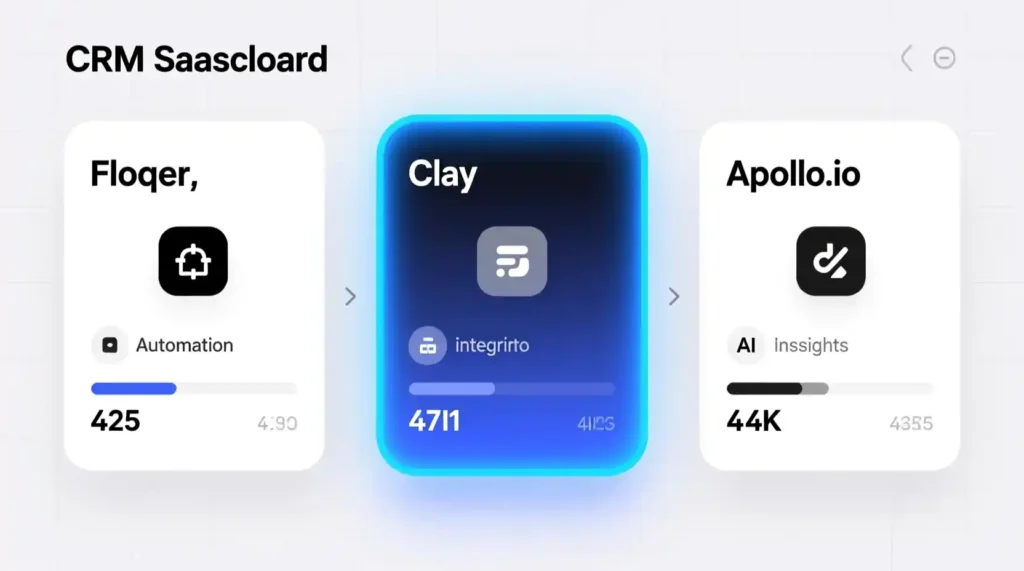
Floqer vs Clay vs Apollo.io (Real Talk Comparison)
Let’s be honest — Floqer’s competitors are strong. Clay, Apollo, and even HubSpot have been around for years.
But Floqer’s edge lies in speed, simplicity, and flexibility.
| Feature | Floqer | Clay | Apollo.io | Google Sheets + Hunter |
| Data Sources | 75+ | 50+ | 25+ | 3–5 |
| Setup Time | <10 mins | 30–45 mins | 20–30 mins | Manual |
| Automation | ✅ Full | ✅ Partial | ⚪ Limited | ❌ |
| Price Transparency | ❌ Not public | ✅ | ✅ | ✅ |
| Ideal For | Startups, creators | Agencies, pros | Sales teams | Beginners |
In short:
- Clay = power tool for big teams.
- Apollo = great if you love email campaigns.
- Floqer = fast, quiet automation for small, scrappy teams.
The Honest Cons – What Floqer Still Gets Wrong

This isn’t a fan post. Floqer has holes, and you should know them before you try it.
- No clear pricing page – Makes it hard to compare value upfront.
- No community or templates yet – You’re figuring things out alone.
- Limited public case studies – It’s early-stage, so few real-world success stories exist.
- Enterprise bias in language – The website still feels built for B2B, not solo builders.
But these are fixable. If the team adds clear pricing and community support, Floqer could go from hidden gem to mainstream tool fast.
Who Should Use Floqer (And Who Should Avoid It)
If you’re still unsure, here’s the simple breakdown:
Use Floqer if you:
- Run lead gen or GTM workflows weekly
- Manage 100+ contacts or prospects
- Hate manual enrichment but want reliable data
- Already use tools like Notion, HubSpot, or Airtable
Skip Floqer if you:
- Do fewer than 10 leads a week
- Don’t use a CRM
- Love doing manual research yourself
- Just want a free, simple system (Google Sheets will do)
Honest truth: Floqer isn’t meant to be cheap — it’s meant to be time-efficient. If your time isn’t stretched, it’s not for you.
My Final Verdict – Is Floqer Worth Trying in 2025?
Let’s strip away the hype:
Floqer is not a game-changer yet. It’s a time-saver — and that’s more valuable than most people admit.
If you’re a founder or marketer buried under messy spreadsheets, Floqer can feel like flipping a switch.
But if you’re early in your journey or working small-scale, it’s okay to skip it for now.
When it matures — adds transparent pricing, tutorials, and a small-business focus — it’ll be the tool everyone’s talking about.
Until then, I’d call it what it is:
Floqer is the quiet assistant your GTM deserves — not loud, not flashy, just effective.
Conclusion – Floqer Review The Future of AI GTM Data Tools
Floqer may not dominate search results yet, but it’s building quietly in the background — and that’s exactly how most powerful tools start.
It’s part of a new wave of AI GTM automation that doesn’t just promise “intelligence” — it delivers time back.
If you’ve been wasting weekends updating leads manually, this is your wake-up call:
Try something smarter.
Maybe it’s Floqer — maybe it’s not.
But it’s definitely time to stop being your own data intern.
FAQ Section: Floqer Review
Q1. What is Floqer used for?
A: Floqer is an AI-powered data enrichment and GTM automation tool that pulls verified contact and company data from 75+ trusted sources, helping startups and marketers save hours of manual data work.
Q2. Is Floqer free to use?
A: Floqer may offer a free or trial plan, but most advanced features like automated enrichment and CRM sync are part of paid plans. Always check their latest pricing updates on the official site.
Q3. How does Floqer compare to Clay or Apollo.io?
A: Floqer focuses on speed and simplicity for startups. Clay is better for agencies, and Apollo.io suits large sales teams. Floqer’s edge is its automated enrichment from 75+ verified data sources.
Q4. Who should use Floqer?
A: Floqer is ideal for solo founders, small marketing teams, and startups that handle large lead lists or run frequent GTM campaigns. It’s built for users who value speed and clean data.
Q5. Who should skip Floqer?
A: Freelancers with small contact lists or people who prefer manual research can skip it. Floqer shines only when you manage 100+ leads or use a CRM.
Q6. What data sources does Floqer connect to?
A: Floqer enriches data using over 75 sources, including LinkedIn, Crunchbase, and other B2B datasets, ensuring accuracy and up-to-date company insights.
Q7. Does Floqer work with HubSpot or Salesforce?
A: Yes, Floqer integrates with major CRMs like HubSpot, Salesforce, and Notion, allowing users to sync enriched data automatically.
Q8. Is Floqer suitable for startups and creators?
A: Absolutely. Floqer helps startups and solo creators automate lead research and GTM workflows without needing enterprise-level budgets or technical teams.
Q9. What’s the biggest advantage of using Floqer?
A: Time savings. Floqer can enrich hundreds of leads in minutes, keeping your CRM accurate while you focus on strategy instead of manual cleanup.
Q10. What makes Floqer different from free tools like Google Sheets and Hunter.io?
A: Free tools work for small lists, but they’re slow and error-prone. Floqer automates everything with real-time data sync, saving hours weekly while improving accuracy.
Pingback: MeDo by Baidu Review Build Powerful Apps in One Afternoon - zadaaitools.com